 MulewalkYour offline AI work companion
Be present in the meeting.
Record the discussion, transcribe it locally, review speaker segments and turn decisions and actions into editable notes.
A little work companion, right on your iPhone.
Capture meetings, organize notes and create documents—even without a connection.
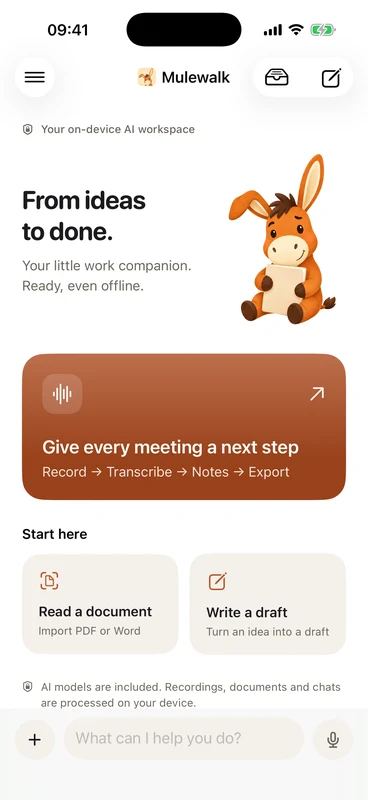
 MULEWALK FOR iPHONE · ACTUAL APP SCREEN
A recording, a document or an idea.
Mulewalk helps with the next step.
Record the discussion, transcribe it locally, review speaker segments and turn decisions and actions into editable notes.
Read PDF, Word and text files. Extract key points, write and revise a document, then export PDF, Word or PowerPoint.
Local tools carry out your task and keep a record of the steps. Find recordings, drafts and results together in your workspace.
Audio, transcripts, chats and documents are processed locally. Mulewalk does not send that work to a developer server. You do not need an account or an API key to start.
Read our privacy policyYes. Core AI, transcription, notes, editing and exports run on your device. Installing and updating the app requires an App Store download. Apple purchase, restore and entitlement services require a connection. System live captions are optional.
No. Models are included, so the app is larger than a typical office app. Initial loading takes some preparation time. Performance depends on your iPhone, available memory, task length and temperature.
The interface supports English and Simplified Chinese. It follows your iPhone's language by default, and you can choose another language in the app's Settings. Speech transcription supports multiple languages and automatically detects the recording language.
The current app requires iOS 26 or later. Device testing has included iPhone 17 Pro. Local models need sufficient memory and storage; compatibility and performance testing are continuing before public release.
The current version includes free core work features. Pro includes personal templates and exporting multiple formats together, with monthly and yearly plans offering the same benefits. Prices are provided by Apple for your region. The app is in TestFlight testing before public release; TestFlight purchases use Apple’s sandbox and do not charge real money.
Mulewalk is preparing for its iOS release. Contact us for product or privacy support.